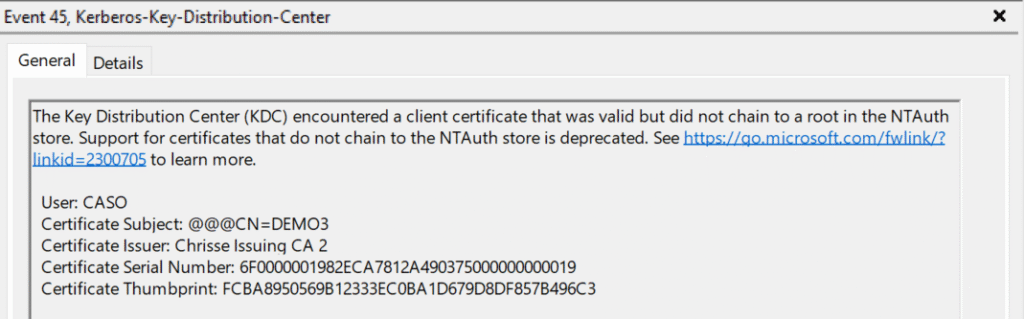
So the security updates for October has arrived and “AllowNtAuthPolicyBypass” registry key is now gone from kdcsvc.dll – All CAs that issue certificates to be used for PKINIT against Active Directory must now be trusted in NTAuth.
Please do not add CA’s to NTAuth that you don’t trust, as any one who can issue a certificate with subject of choice from those still can impersonate any user account within your forest e.g. a DA/EA and this is regardless of StrongCertificateBindingEnforcement and NTAuthEnforcement.
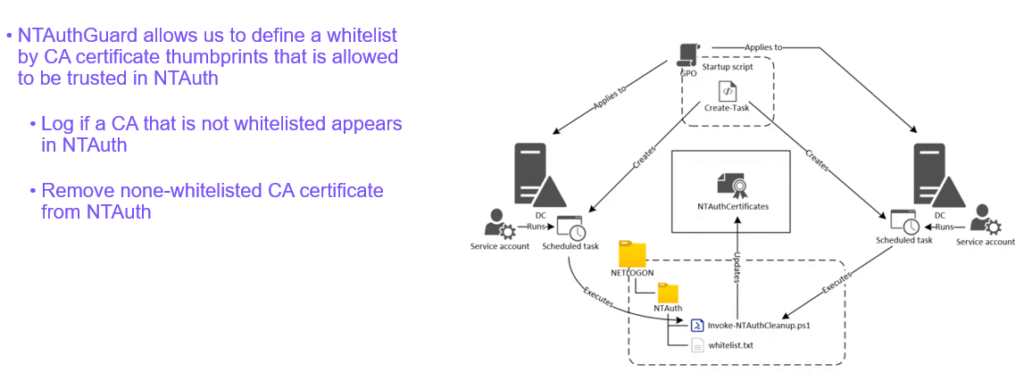
A good solution to keep NTAuth safe is NTAuthGuard by Carl Sörqvist.
But as I use to say, there is always a secret key – as with “StrongCertificateBindingEnforcement” another key instead of “AllowNtAuthPolicyBypass” can be used to “unsupported so far I know” turn off the NTAuthEnforcement requirement. You will find it by using:
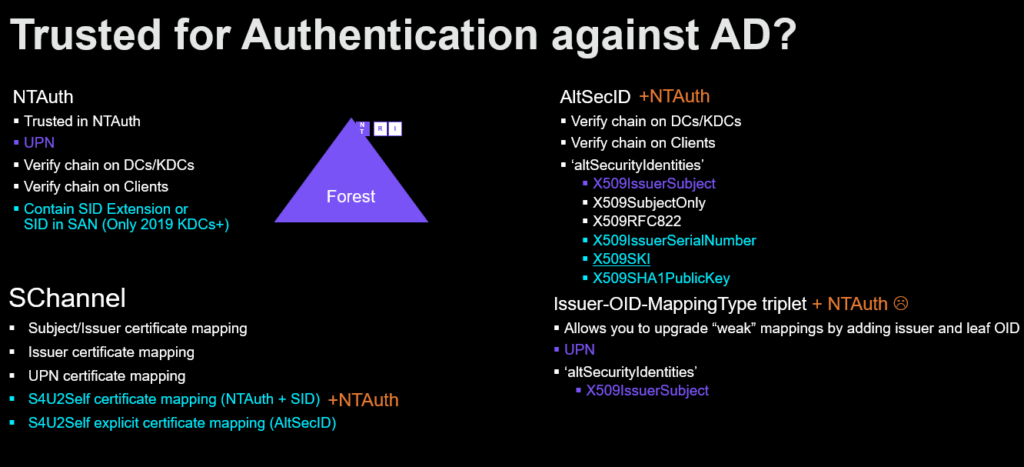
Hybrid Identity Protection (HIP) Conference 2025 is over and I presented on the Active Directory and PKI subject again: “Enterprise PKI Today: Friend or Foe”
StrongCertificateBindingEnforcement vs NTAuthEnforcement
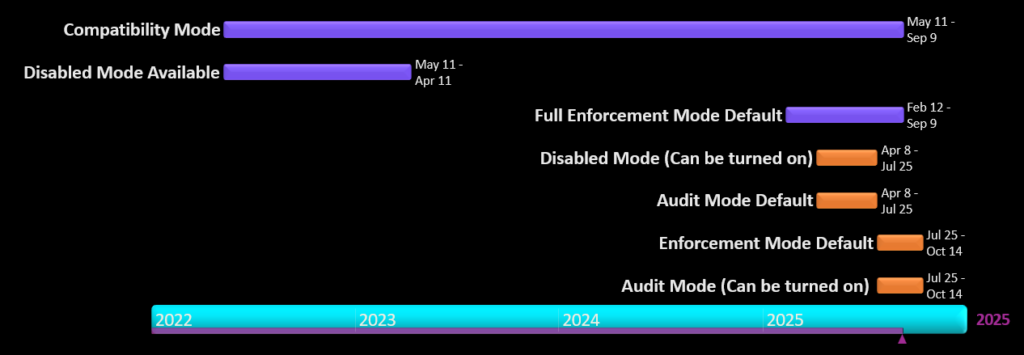
StrongCertificateBindingEnforcement has been mandatory since 10th of September 2025 with no supported way of doing a optout to Compatibility Mode. Enforcing this took over 3 years – and where still not done – while the ‘StrongCertificateBindingEnforcement’ registry key is gone from “kdcsvc.dll” with the September updates. However there is a new key available to still optout but that key is only intended for special cases and should NOT be used, but you can find it by string dumping the “kdcsvc.dll” at a specific offset.
Please be aware that the StrongCertificateBindingEnforcement only protect you from what it was designed to – the following:
dNSHostName/servicePrincipalName computer owner abuse, Remove DNS SPNs from servicePrincipalName, steal DNS hostname of a DC, put it in your computer accounts dNSHostName attr and request a cert, auth (PKINIT) with the cert and you’re a DC.
Overwrite userPrincipalName of user to be of target to hijack user account since the missing domain part does not violate an existing UPN
Overwrite userPrincipalName of user to be @ of target to hijack machine account since machine accounts don’t have a UPN
Delete userPrincipalName of user and overwrite sAMAccountName to be without a trailing $ to hijack a machine account
Note: 2-4 would require permissions to write to the ‘userPrincipalName’ attribute
It will NOT protect you from:
CAs trusted in your forest where you don’t have a good security hygiene for issuance of certificates
If someone can issue a certificate with subject + sid they own that security principal in your Active Directory Forest.
Subject + SID in AltSubject is sadly enough – tag:microsoft.com,2022-09-14:sid:<value>
•If you’re using Authentication Mechanism Assurance (AMA) – you must control/prevent issuance with specific issuance policies.
Bad certificate template hygiene
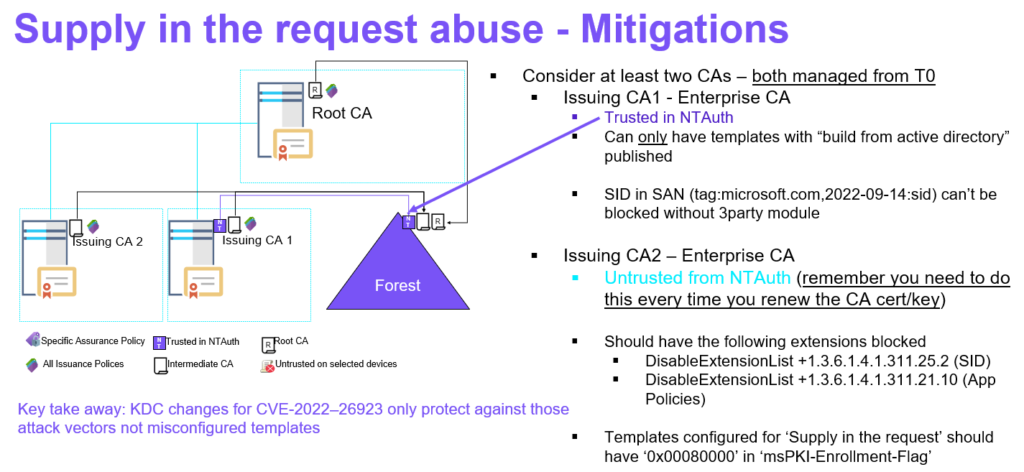
Supply in the request (SITR) should never be published on a CA trusted in NTAuth
Write access to certificate templates outside Tier 0 allows for SITR to be enabled.
3rd party/standalone CAs or RA’s/EA’s – you’re on your own to block the above.
NTAuthEnforcement
Since July the NTAuthEnforcement has been enabled by default, meaning that all CAs that issue certificates to be used for PKINIT must be trusted in NTAuth – this changes the picture.
Before this new requirement it was possible to be trusted for PKINIT even if the issuing CA was not trusted in NTAuth – if a strong mapping method was used using AltSecID (altSecurityIdentities). This is no longer possible after CVE-2025-26647 as X509SKI (Subject Key Identifier) for example was considered a strong mapping, but it is possible to create a certificate with a designated SKI (Subject Key Identifier) from any trusted CA – this becomes problematic as you could create a SKI (Subject Key Identifier) of an existing mapped user – a T0 administrator for example and become that security principal within the forest.
In my past post “When your Enterprise PKI becomes one of your enemies (Part 6)” i demonstrate how to – Create, Distribute and Force-Trust your own Fake CA within a forest to perform a T1 to T0 privilege escalation – at that time leverage Authentication Mechanism Assurance (AMA).
But let’s using CVE-2025-26647 instead, let’s say we found a T0 – “strongly” mapped with SKI (Subject Key Identifier) within the Active Directory forest.
You can for now until the October patch wave arrive opt-out from the NTAuthEnforcement but then you would be vulnerable to the above “HKEY_LOCAL_MACHINE\SYSTEM\CurrentControlSet\Services\Kdc\AllowNtAuthPolicyBypass=1”
Summary
Same mitigation as presented before applies – make sure you have two enterprise issuing CAs where one of them isn’t trusted in NTAuth – this one can publish – Supply in the request (SITR) templates, while the other CA that is in NTAuth – Never should have any – Supply in the request (SITR) templates published. All and both Enterprise CAs must be managed from T0 this is very important, however they can issue certificates to lower tiers.
Strong Certificate Binding Enforcement protects against CVE-2022-34691, CVE-2022-26931 and CVE-2022-26923
It will NOT protect against bad security hygiene on our CAs, Templates or information within your certificates.
NTAuth requirement will protect against CVE-2025-26647 and eliminate all other paths to PKINIT that didn’t required NTAuth
Fake CA Scenario
AMA Abuse using altSecID from non-NTAuth CA
Note all my demos uses ‘CertRequestTools‘ from Carl Sörqvist and in this case also Rubeus from Will Schroeder.
This blog post will describe and go into details about the may not so known Active Directory Database Epoch / Copy Protection.
This concept that was introduced with Active Directory Application Mode) ADAM initial release (Now follows some ADAM history), but never made it to Active Directory Domain Services (AD DS) until Longhorn/WS2008 for some good reasons. One of the changes with Windows Server 2008 was that AD got exposed as a windows service allowing admins to stop, restart and start the service on DCs, this behavior already existed since day one in Active Directory Application Mode (ADAM ) first introduced as a standalone package to the web in November 2003 and was also targeting Windows XP, in Windows Server 2003 R2, Active Directory Application Mode (ADAM) Service Pack 1 (SP1) is included as a windows component (On CD2) but still ship as a download for other operating systems, Active Directory Application Mode (ADAM) Service Pack 2 (SP2) is the latest version to ship except some QFEs and Security Updates before the source code of Active Directory Application Mode (ADAM) merges into the Directory Service (DS) source depot, integrates into windows builds and get’s available again with Windows Server 2008/Windows 7 rebranded as Active Directory Lightweight Directory Service (AD LDS) as an installable role with the operating system – no more downloads are available.
The potential issues and damages that this feature is trying to protect from, given the above.
Pre-Windows Server 2008 and ADAM it wasn’t that easy to manually restore or replace the database (DIT) using none supported restore methods for let’s say average sysadmins – you needed to boot into DSRM – Directory Services Restore Mode cause the DB was locked by LSASS/ESE and the database by default was located under C:\Windows folder.
Now with these requirements gone as peer Windows Server 2008 and ADAM/AD LDS – Microsoft wanted to prevent some scenarios:
Potentially foreseen scenarios:
• Stop service, copy off database, restart service, make changes that replicate, stop service, copy old database back in.
• Stop service, copy off database from instance1, stop second service, copy database over data files for instance2.
Both these scenarios breaks the Active Directory replication model, because two different/distinct changes could get the same <OriginatingInvocationID>:<OriginatingUSN> pair (lets call this the ChangeID). If two changes have the same ChangeID, one of those two changes would fail to replicate, because the DSA will claim to have “seen” the change with the same ChangeID, from the previous instance of the database, and fail to replicate the new change with this ChangeID. Also, other partners of this instance, will assume they’ve seen any new changes made that match previous changes this DSA has replicated out.
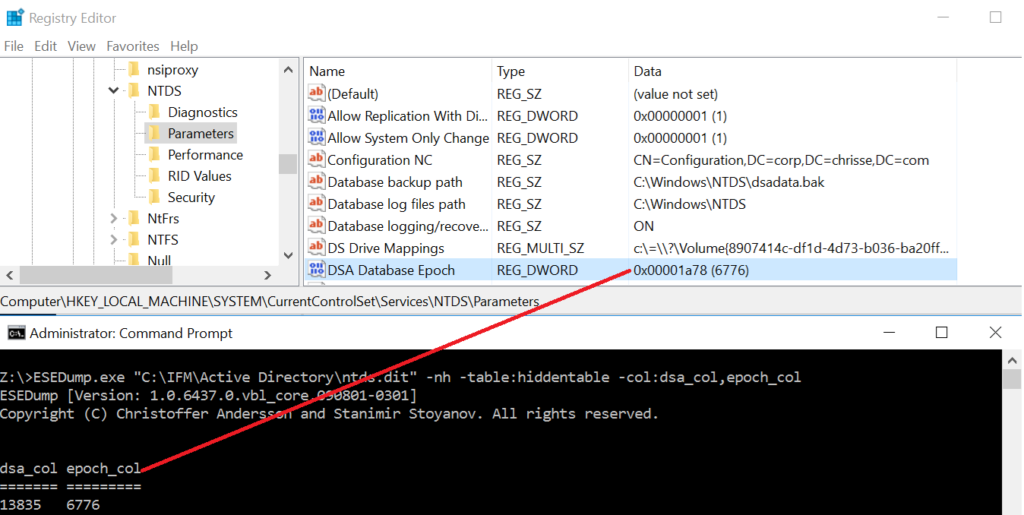
The implementation – a database epoch stored in both in the database (DIT) and the registry, during initialization of the DSA and the DB a random value is written in case of a none-existent epoch or the current epoch +1 is written both to the database (DIT) – more specifically to the “epoch_col” column in the hiddentable and the “HKEY_LOCAL_MACHINE\SYSTEM\CurrentControlSet\Services\NTDS\Parameters\ DSA Database Epoch” Registry DWORD.
Rules are as following
If both the registry and the database have NULL – it’s considered a match. The epoch is initially set with rand() in both the database and the registry
if the value stored in the database is > than the value stored in the registry – it’s considered a match.
If the value stored in the database and the registry match – it’s considered a match
If either 2 or 3 the epoch is advanced by 1 in both the database and the registry, if any of the updates fail the ESE update to the DIT is rolledback.
If the “HKEY_LOCAL_MACHINE\SYSTEM\CurrentControlSet\Services\NTDS\Parameters\ Disable DSA Database Epoch Check” Registry DWORD is set to 1 it’s considered a match.
If the values do not match as per above 1-3, a “restore” is forced to get a new invocationID for the DSA/DRA and the following event is logged:
Table 1: Epoch mismatch and restore initiated.
Event ID
Source
Category
Description
2524
ActiveDirectory_DomainService
Backup
The Directory Server detected that the database has been replaced. This is an unsafe and unsupported operation. User Action: None. Active Directory Domain Services was able to recover the database in this instance, but this is not guaranteed in all circumstances. Replacing the database is strongly discouraged. The user is strongly encouraged to use the backup and restore facility to rollback the database.
The “restore” is forced by writing/setting the “state_col” in the “hiddentable” to “4” aka “BackedupDIT” as well “uns_col” to next USN-1 and “backupexpiration_col” to the next day.
If there is any other failure than retrieving the epoch from the database than that the column is null/nonexistent or that the registry value is nonexistent – the DSA is going to fail init and stop hard with the error message:
Table 2: Epoch mismatch fatal
Event ID
Source
Category
Description
2542
ActiveDirectory_DomainService
Backup
The Directory Server detected that the database has been replaced. This is an unsafe and unsupported operation. The service will stop until the problem is corrected. User Action: Restore the previous copy of the database that was in use on this machine. In the future, the user is strongly encouraged to use the backup and restore facility to rollback the database. This error can be suppressed and the database repaired by removing the following registry key. Additional Data Registry key: System\CurrentControlSet\Services\NTDS\Parameters Registry value: DSA Database Epoch
Note that this feature could have been implemented differently, technically there is no need to change/advance the epoch each time during init, not even during an originate write to the database (DIT) – however it must only really change if a new originate write is replicated off the local DSA.
I wrote this blog post because I got a question – “So what happens when distribution DIT is mounted” – If you don’t know what the distribution DIT is you can read about it here: https://blog.chrisse.se/?p=1005
The answer to the question can be figured out by reading this post (Rule 1 above), The answer explained is that the “epoch_col” is NULL in the Distribution DIT and once the DSA Initialize on the Distribution DIT for the first time the registry value don’t exist and peer above that is considered a match, a random value is written as the initial epoch to both the database (DIT) and the registry on the DSA.
Bonus: the “state_col” of a distribution DIT should be “1”.
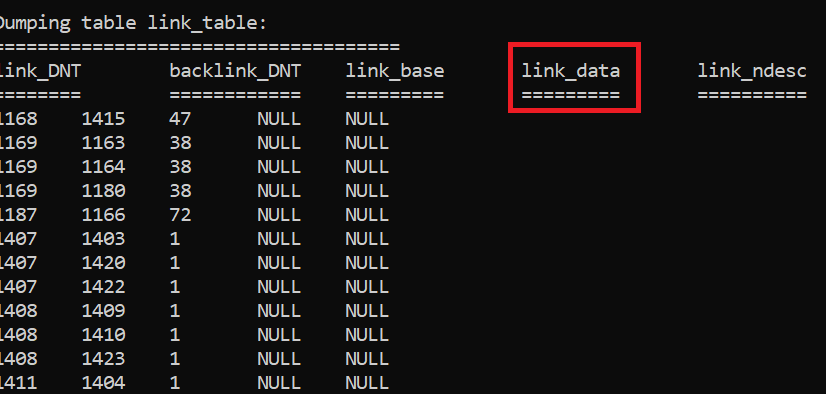
It will NOT remove FAS (Filtered Attribute Set) from the link_table? Can you even have that? Sure in the “link_data” column for the string/data portion of a linked attribute with syntax DN-String or DN-binary: https://learn.microsoft.com/en-us/windows/win32/adschema/syntaxes
Dumping the “link_table” from a Windows 2000 Server DC just because there are only a few initial columns in the table initially at Windows 2000 DCs and I have all kinds of DIT’s around for testing when I write tools.
So now we’re coming to the scrubbing part – Let’s say you used the VSS API and the NTDS Writer with the “RODC_REMOVE_SECRETS;” _AND_ cleaned up any potential linked FAS attribute that stored it’s data in the ‘link_data” column by your own.
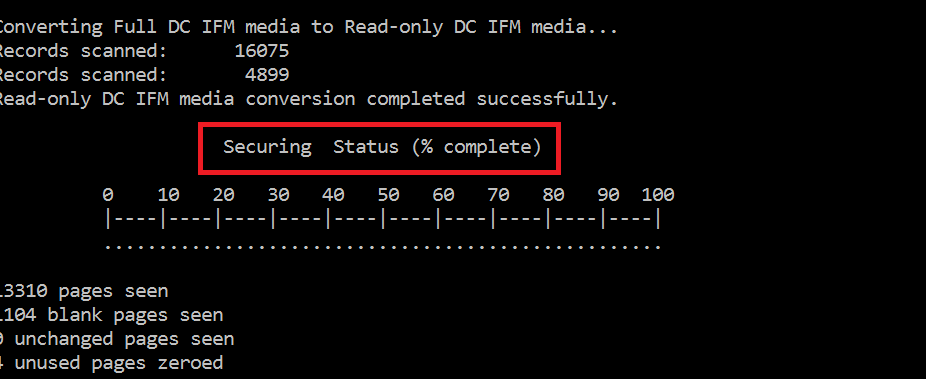
Would the NTDS.DIT be secure? Nope – you need to scrub your DIT so it becomes secure. You just call into esent.dll?JetDBUtilitiesW and ask for a scrub operation (opDBUTILEDBScrub) to take place, if I say securing the DIT instead of scrubbing, sounds more familiar to you?
So why is this done? Well the “NTDS Writer” with the “RODC_REMOVE_SECRETS;” just call regular jet/esent APIs to delete the columns/attributes that contained hidden, secret or FAS data – and that is what you’re doing in the “link_table” as well but it’s more complicated as we can’t drop the entire column, instead the value for a specific row representing the linked attribute need to reset the data in the “link_data” column using for example JetSetColumn | JetSetColumnDefaultValue
Regardless of the above, there is no guarantee that all metadata and left over data isn’t still present somewhere in the database – hence the need to secure / scrub the DIT.
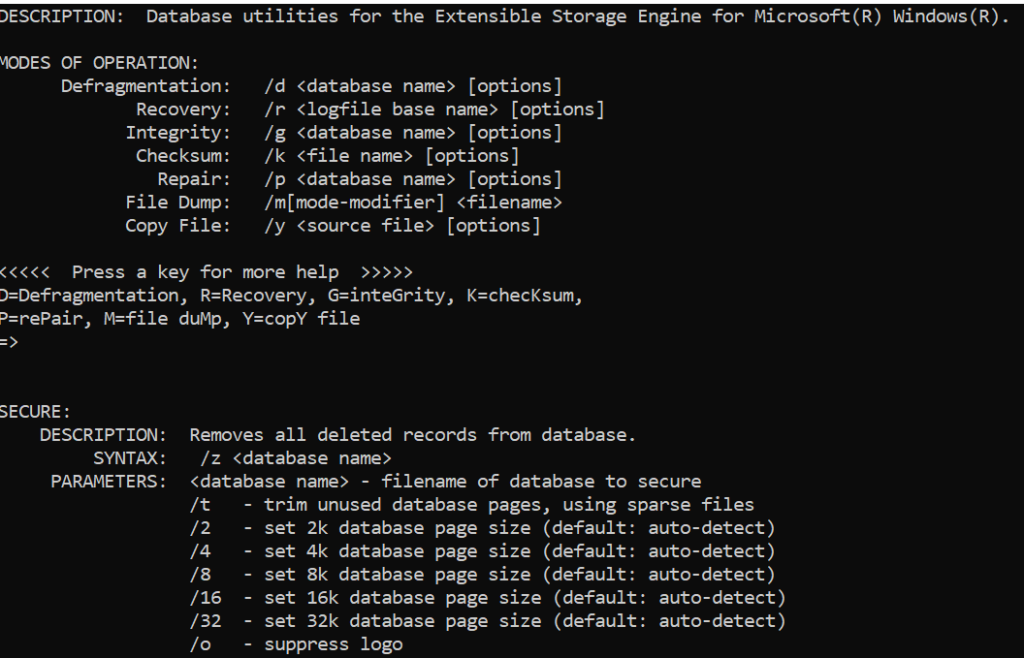
By the way you don’t need to write up your own code and call into esent.dll?JetDBUtilitiesW you can just use the undocumented option “Z” of esentutl.exe that has been there since Windows Server 2008:
So every Windows Server has an NTDS.dit file right? Well, All Windows Server – Domain Controllers you mean right? Nope they in fact have two J
There is something referred to as the distribution DIT that works as a template DIT and is used when you promote a machine to a DC (either ADAM/ADLDS or ADDS) either as the first dc in a forest or as a replica.
The distribution DIT can be found at the following location:
Table 1: Distribution DIT Location
Location
Location
SXS
OS
ADDS
%windir%\system32\ntds.dit
N/A
Windows 2000 Server
Windows Server 2003
ADDS
%windir%\system32\ntds.dit
Yes
Windows Server 2008
Windows Server 2008 R2
Windows Server 2012
Windows Server 2012 R2
ADAM/ADLDS
%windir%\ADAM\adamntds.dit
N/A
Windows XP * Separate download
Windows Server 2003 * Separate download or R2
ADAM/ADLDS
%windir%\ADAM\adamntds.dit
Yes
Windows Vista * Separate download
Windows 7 * Separate download
Windows 8
Windows Server 2008
Windows Server 2008 R2
Windows Server 2012
Windows Server 2012 R2
Note: SxS means that the files are package in the SxS folder on the disk and isn’t copied into the location until the actual role is installed.
So what is the Distribution DIT and when is it used?
It’s actually the DIT all DCs start out with except one case
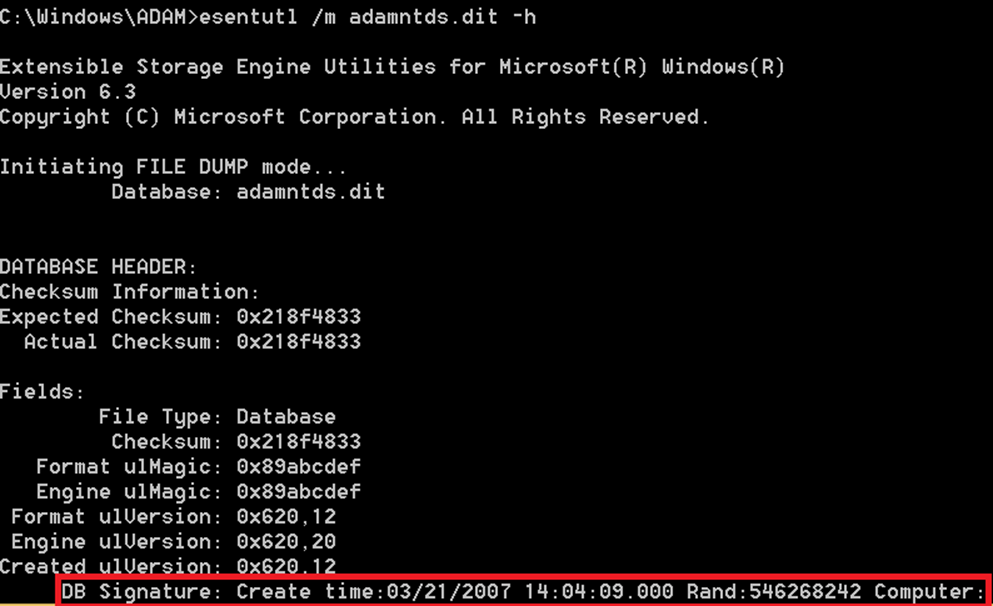
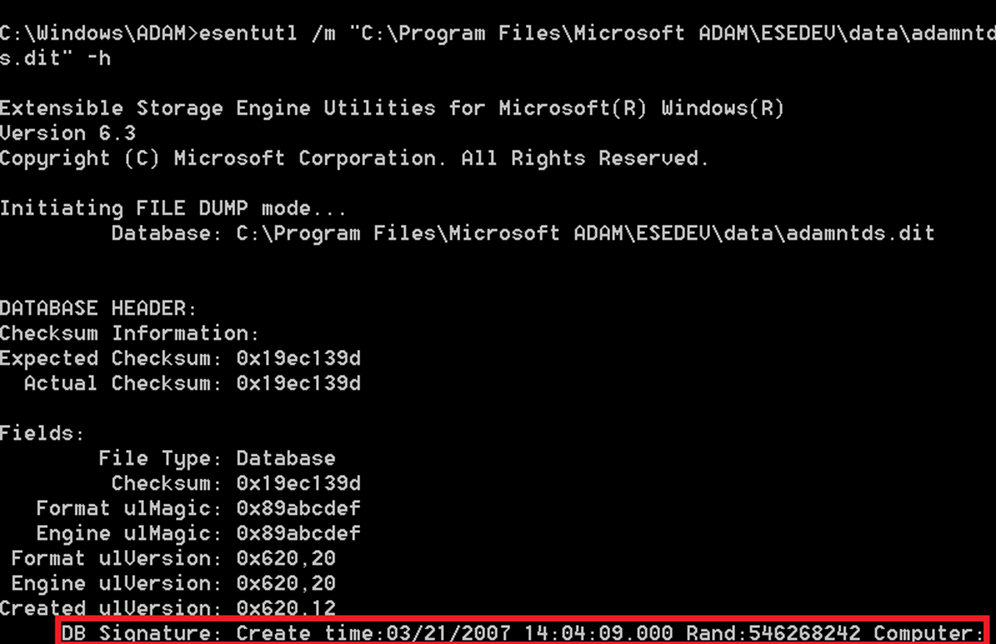
The distribution DIT is copied to the database location (DatabasePath) specified in DCPROMO during promotion, we can verify this by checking the JET database signature of the two databases once DCPROMO has completed, in my case I compare between the distribution DIT for ADLDS and my installed ADLDS instance ‘ESEDEV’
Distribution DIT:
Installed/Promoted DIT:
As you can see – They do match.
So what does the Distribution DIT contains?
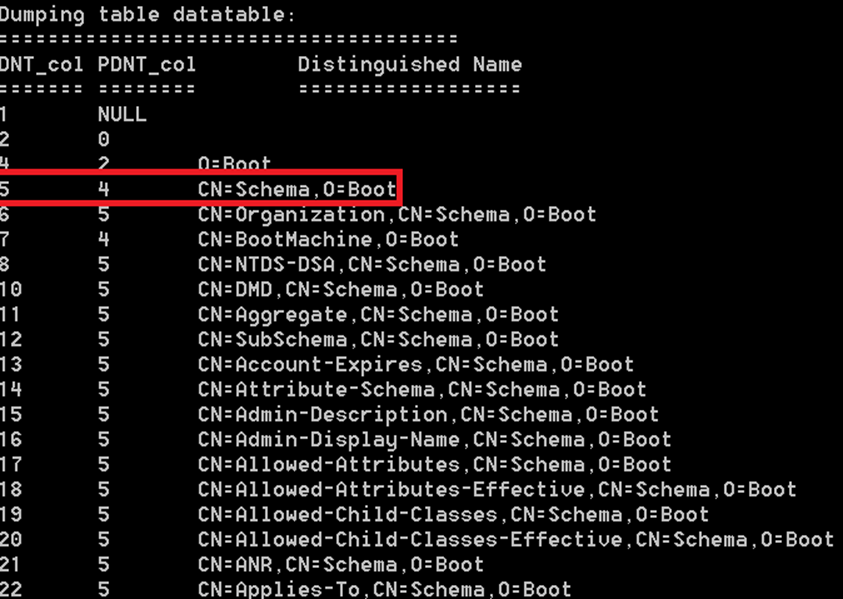
The distribution DIT contains the base schema for either ADDS or ADLDS (that has a more light weight schema that ADDS) – So here my tool ESEDump comes into play, let’s dump a distribution DIT for ADLDS:
Dumping table datatable:
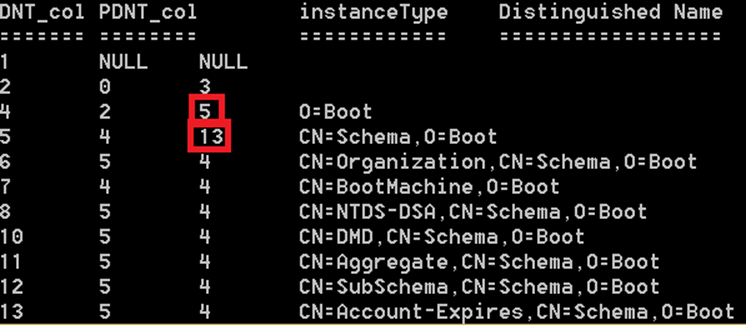
We can see that the first rows inside the distribution DIT contains O=Boot and CN=Schema,O=Boot, CN=BootMachine,O=Boot and then simpely the schema comes, we can see that all of the schema objects has a PDNT that equals == 5, the DNT of the CN=Schema,O=Boot naming context (NC) – Or wait are they really NCs? – let’s add in ‘instanceType’
Yes they are NCs – InstanceType decoded as follows:
So what is CN=BootMachine? This is a fake DSA so that the code can use common routines during install (Can’t explain it better than starting an entire new article – might happen someday)
So what happens during install?
So it’s time to determine how the schema in the distribution DIT is used during install (or promotion of a new domain controller) – well it depends – if it’s used at all.
These are the different cases.
Promoting the first domain controller in a forest:
The distribution DIT is copied into the database location (DatabasePath) specified in DCPROMO.
A domain naming context is created in the DIT (except for ADAM/ADLDS)
A configuration naming context is created in the DIT.
A schema naming context is created in the DIT.
The boot schema is moved from CN=Schema,O=Boot to the newly create schema naming context.
During this move the following happens for all objects that has a PDNT of:4 e.g. the CN=Schema,O=Boot:
Object’s are moved to CN=Schema,CN=Configuration,X=foo
As the object’s are moved their ancestors_col must be updated in the DIT to inheritance from the new CN=Schema,CN=Configuration,X=foo
As the object’s are moved from one naming context (NC) (CN=Schema,O=Boot) to another (CN=Schema,CN=Configuration,X=foo) their NCDNT_col in the DIT needs to be updated as well.
Object’s have their metadata updated , fields updated are:
OriginatingDsa
timeChanged
Give the object a new GUID.
Set a default security descriptor depending on ADDS or ADLDS and depending on if attribute or class.
The prefixMap is read of CN=Schema,O=Boot and saved into the prefixMap of CN=Schema,CN=Configuration,X=foo More information on the prefixMap/prefixTable can be found here: http://msdn.microsoft.com/en-us/library/cc228445.aspx
Note: This allows the distribution DIT to contain schema entries that the DSA doesn’t have knowledge about (e.g. other attributes and classes than the base schema can come pre-loaded) – This used to be the case for Small Business Server that pre-loaded the Exchange Schema.
Removing CN=BootMachine,O=Boot
Removing CN=Schema,O=Boot
Removing O=Boot
Promoting a replica in an already existing forest:
Remove the following as a schema already exists in the enterprise and will be replicated in.
Removing all object’s with a PDNT of 4 == e.g. all objects that have CN=Schema,O=Boot as parent.
Removing CN=BootMachine,O=Boot
Removing CN=Schema,O=Boot
Removing O=Boot
Both in case A (First DC in the forest) and case B (Replica in an existing forest) – the install code will trigger the garbage collector so it can immediately delete all traces of the O=Boot naming context (NC) and its decadent object’s.
This article started out by a question that was – How can the Schema naming context (NC) has a higher USN than many of the attributes in the schema – Doesn’t the schema container have to be created first, before its child objects? – Well we know the answer to that question already but let’s confirm it.
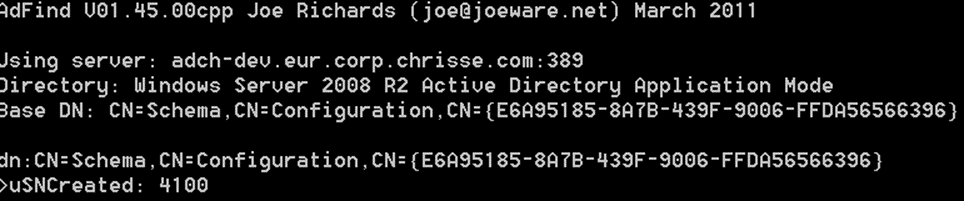
Let’s get the “usnCreated” on the Schema naming context (NC):
Ok, it’s 4100.
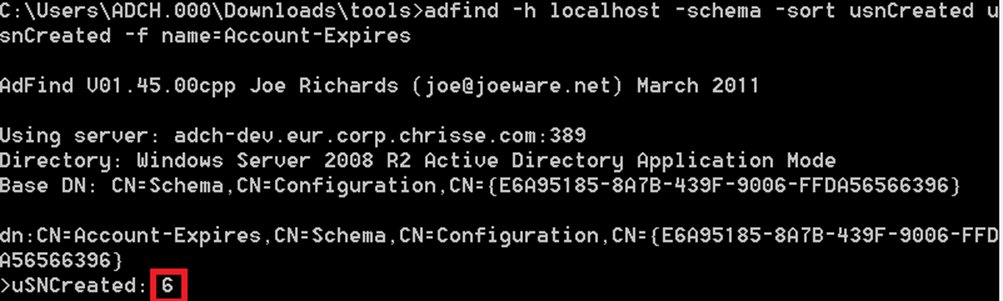
Let’s try an attribute “Account-Expires”
OK, that’s a pretty low “usnCreated” and much lower than the Schema naming context (NC) above.
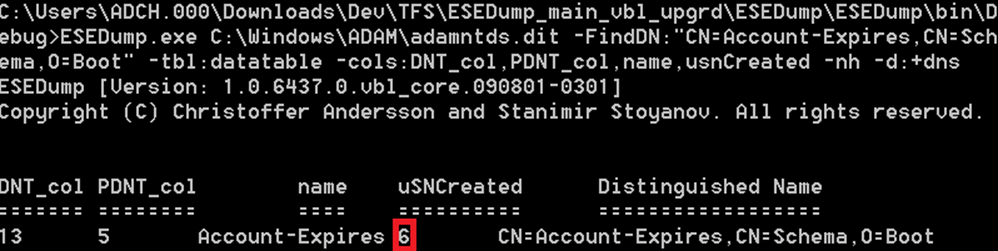
So let’s look up the “Account-Expires” in the distribution DIT:
Yes , “usnCreated” is 6 in the distribution DIT as well, with other words “usnCreated” will come from the distribution DIT for base schema object’s, hence they have a lower usnCreated than the schema naming context (NC) itself.
I just played along with a Windows Server 2012 R2 DC and noticed a undocumented registry key (this might was added in already in Windows Server 2012) but is not in Windows Server 2008 R2 or earlier releases – The key are:
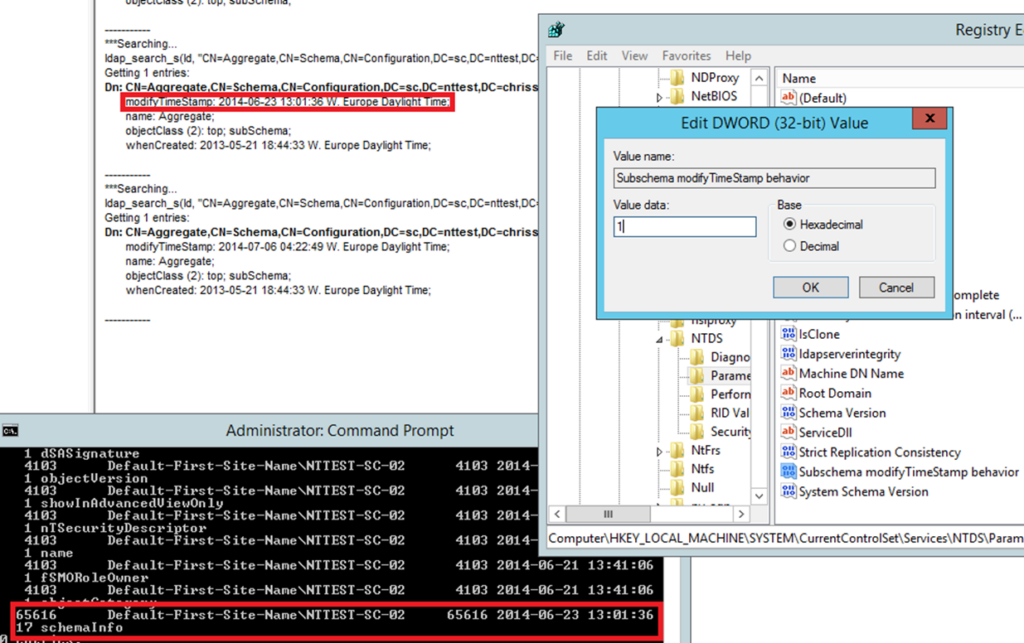
‘Subschema modifyTimeStamp behavior’ DWORD registry values can be configured within the following key: HKEY_LOCAL_MACHINE\SYSTEM\CurrentControlSet\services\<INSTANCE>\Parameters. Note: if the key doesn’t exist or have a value of 0 the default behavior will apply.
But what happens, and what works different if a value of ‘1’ is used?
It seems like we’re getting the time of when the schema actually was updated, and not just when the schemaCache was updated – as the ‘modifyTimeStamp’ attribute will indicate by its default behavior if you request it over the subschema. I compared the time of ‘modifyTimeStamp’ and the metadata for the ‘schemaInfo’ attribute to verify this (more on that attribute another day, if someone want?)
So what can this be used for? I have no idea J One can just read off the schemaInfo instead.
Windows Server 2008 SP2: Lsass.exe process crashes and error code 255 is logged because of a CNF NTDS Settings object in Active Directory on Windows http://support.microsoft.com/kb/2913087/en-US
The DC Locator flags to specify the requirements of a Windows Server 2012 DC or a Windows Server 2012 R2 DC using the DsGetDCName API are as following:
Table 1: Windows Server 2012 DC Locator flags
Name
DS_DIRECTORY_SERVICE_8_REQUIRED (0x200000)
Requires that the returned domain controller be running Windows Server 2012 or later.
DS_DIRECTORY_SERVICE_9_REQUIRED (0x400000)
Requires that the returned domain controller be running Windows Server 2012 R2 or later.
The exception is the DMD or the SubSchemaSubEntry “CN=Aggregate,CN=Schema,CN=Configuration,DC=X“
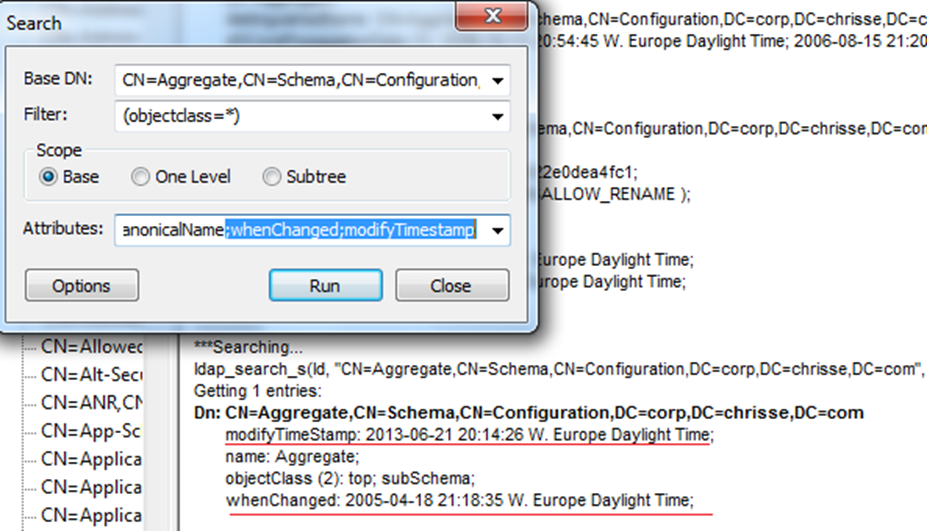
Let’s have a look with LDP.exe:
So this clearly shows that ‘modifyTimeStamp’ is NOT based on the ‘whenChanged’ attribute for the subSchemaEntry.
How it really works
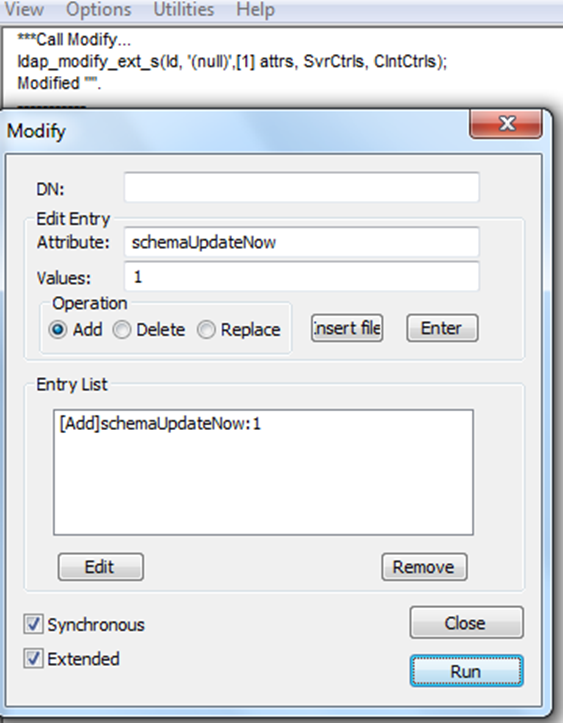
Let’s agree we have confirmed that, so to the next question, what is it based on? Well it’s based on the last time the in-memory schema cache of the particular DC was updated either during boot or by manually triggering the operational attribute “SchemaUpdateNow:1”
So let’s try that?
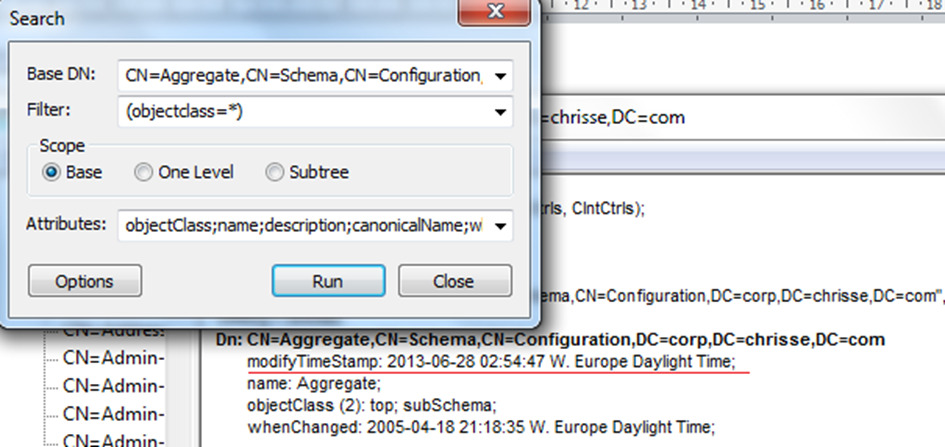
So let’s have a look again:
Yes – “modifyTimeStamp” now shows todays date: 2013-06-28 instead of previously 2013-06-21 J
Why it was implemented
So I guess now there is really one good question left, why?
The answer can be found if you read up on RFC 2251 that says:
“modifyTimestamp: the time this entry was last modified” – you can read further on MSDN where you can see what functionality defined in RFC 2551 Active Directory has implemented: http://msdn.microsoft.com/en-us/library/cc223231.aspx
It’s late and I’ve just gone thru the “Windows Server 2012 R2 Preview” schema aka “Schema 69” and it seems like it first introduces an attribute to the schema that it later on in the process will defunct.